
FAQ
Frequently Asked Questions
GENERAL QUESTIONS
SparkBlue is the digital engagement platform of UNDP’s Global Policy Network, connecting UNDP staff globally with over 65,000 development practitioners.
SparkBlue is also the new home for UNDP’s Communities of Practice and the one-stop-shop to get updates, news, reports on UNDP’s COVID-19 2.0 Offer, including access to UNDP’s COVID-19 monitoring dashboard.
If you have a UNDP email, you don't need to create an account, you can simply log in with your UNDP account and immediately start browsing the platform. Some key information on your profile will auto-populate via Delve. Make sure your name, contact details, role, affiliation, and profile photo are all featured in your new SparkBlue profile. Add anything that is missing.
There are three different access levels available on SparkBlue, depending on your type of affiliation and on the type of engagement you might have been invited to join.
- UNDP: Anyone with a UNDP email address can automatically sign in, using their UNDP email and password. UNDP staff can access all specific pages such as CoP pages, internal COVID-19 Offer, AccLab dashboard, and all public SparkBlue content.
- PUBLIC: All SparkBlue public content is accessible to external audiences as well, provided they register to the platform first. External users can also contribute to discussions and other engagements that are set as ‘public’.
- INVITE ONLY: selected engagements happen within private groups and are hence visible/accessible only to pre-defined group members. Only external and internal participants who have been invited to join such groups can access these engagements.
Developed in consultation with colleagues across UNDP country, regional and HQ offices, SparkBlue is meant to meet your needs for online engagement, both internally with fellow UNDP colleagues via our Communities of Practice, and externally with development partners and stakeholders.
On SparkBlue it is possible to set-up and launch curated engagements and consultations locally, regionally, and globally. The platform will help ignite collective intelligence, facilitating UNDP’s role as a convener and integrator, and ultimately unlocking more robust outcomes.
SparkBlue is set to support the work of UNDP staff and development practitioners, allowing better access to tools, resources, knowledge, and opportunities to engage, discuss, work together – all within the shared space of the SparkBlue platform and community.
At the core of SparkBlue is the opportunity of conducting curated consultations and ‘virtual missions’: through a dedicated team of experts and facilitators, SparkBlue unlocks the unique opportunity of managing purpose and impact-driven engagement activities online, generating more robust outcomes.
Ultimately, SparkBlue is a one-stop destination that can help you funnel, organize, condense efforts, streamlining processes, and increasing efficiency. This is even more important and functional today, as international organizations have growingly moved their work and key programme activities online, as a consequence of COVID-19.
Three key aspects define and shape SparkBlue’s core functions, making it your new go-to space to work, share, collaborate:
- In the aftermath of COVID-19, SparkBlue offers UNDP and partners an interactive and dynamic space to host what used to happen offline, including missions, events, and face-to-face interactions;
- SparkBlue is a new, easy-to-use, and intuitive digital community. It does not substitute pre-existing tools but rather features brand new functions and possibilities, including cross-platform integrations with Yammer and Teams;
- Not just “another platform”, SparkBlue is set to become a valuable resource to make your work easier and better. By focusing on purpose and impact driven engagements, SparkBlue empowers UNDP staff to think out loud, learn from each other, connect, share, and co-create.
All consultations to be conducted via SparkBlue go through a preliminary QA (Quality Assurance) process, to ensure the right approach and tools are used. Actual cost for a consultation depends on many factors such as: duration, extent, complexity, internal or external etc.
Please contact the SparkBlue team to discuss your needs and better understand options: [email protected]
SparkBlue is a digital engagement platform, welcoming internal/external participation. SparkBlue is not related to the UNDP SPARK (Strive. Perform. Aspire. Reimagine. Know.) Programme which instead focuses on career development opportunities and targets UNDP staff only
You can write us at [email protected] with any question, doubt or feedback, including:
- Any question or feedback on technical aspects, i.e. access problems
- Any question on consultations, i.e. how engagements work, what availability there is to host a curated engagement, …
- Any content-related question
- Any request to organize a SparkBlue webinar or platform walkthrough for your team
TECHNICAL QUESTIONS
Not at all! The SparkBlue platform automatically translates into over 100 languages!
SparkBlue is the digital platform for the Global Policy Network (GPN), developed under UNDP’s Digital Strategy to support the need for structured e-discussions and crowdsourcing and the ability to connect with external practitioners.
The SparkBlue platform has been conceived and set-up in close collaboration with other related teams such as OIMT to ensure there is no duplication, but value added to existing tools. Further, SparkBlue features cross-platform integration with Yammer: for instance, you can now bring your Yammer conversations onto SparkBlue, and viceversa. Delve profiles also automatically translate to SparkBlue when you register with your UNDP email account.
The following fields from your Delve profile should migrate to your SparkBlue account automatically:
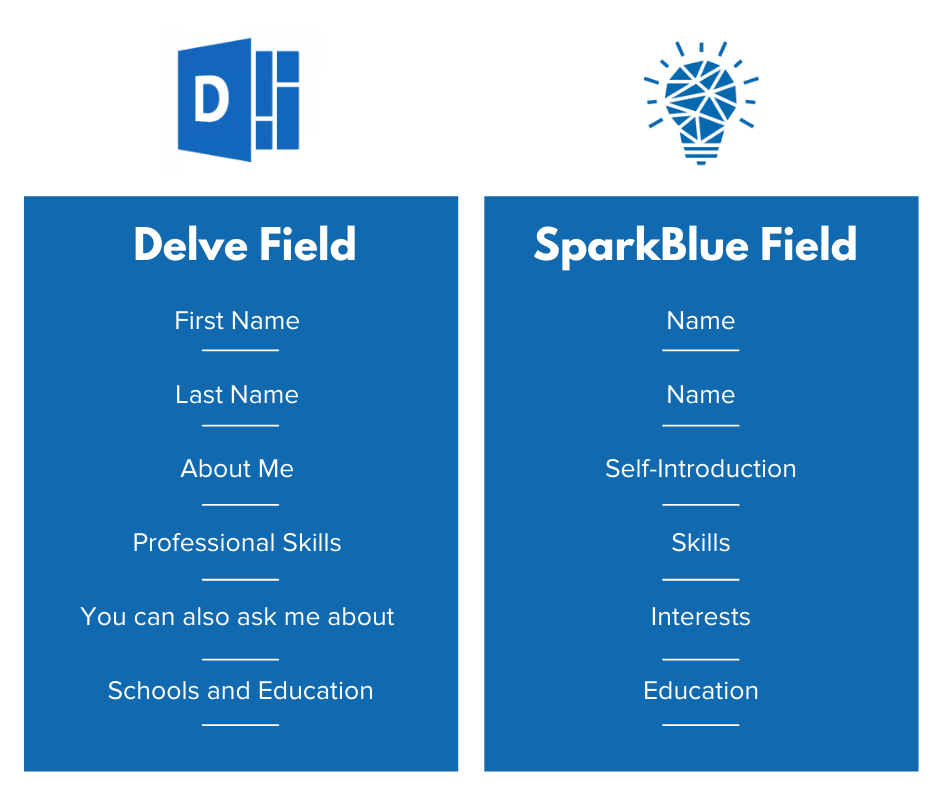
Check your SparkBlue profile upon logging in and if you notice anything is missing:
- Make sure your Delve profile is up to date
- Get in contact with the SparkBlue team at [email protected]
Also, please remember to upload a profile photo as this information will not come across automatically.
On SparkBlue, TAGs are used to ensure all content and interactions are organized effectively. For example, all content that you see on a specific CoP homepage is there because it has been tagged specifically for that CoP.
TAGs are a great way to always keep up to date on content, interactions, news that matter to you and your work. Upon following a TAG, you will receive notifications via email and on the system about new content and interactions related to that TAG.
The most common place to find a TAG and then follow it is on the top right of any CoP homepage. You may also find other opportunities to follow TAGs on pages covering a singular thematic topic to which TAGs have been tied-to.
To follow a TAG, all you have to do is click on “FOLLOW”. Upon doing that, you will start receiving notifications via email as well as within the system, whenever new content and interactions related to that TAG are added.
To manage your TAG subscriptions, click here. To manage your email notification preferences, access your profile settings.
SparkBlue houses many resources relevant to each CoP and online engagement. You can find the full collection of resources on SparkBlue by visiting the resource library.
These resources are curated by our CoP facilitators and other content managers. The resource library is not meant to be a comprehensive set of knowledge products across UNDP, but instead, this set of resources is meant to offer complementary products and information for our CoPs and online community.
QUESTIONS ON CoPs
Communities of Practice (CoPs) are here to support your work. Bringing together a network of thematic experts and practitioners, they are your ‘go-to’ place to pose questions, identify solutions, connect with experts, and share challenges and opportunities across the UNDP network.
With your active participation, CoPs aim to enhance learning through our business processes, promote inclusive policy and strategy development, and reinvigorate how we collaborate as ONE global team.
Thousands of members from across UNDP take part in CoPs to:
- Learn from each other
- Share their experiences
- Co-create solutions
- Inform future-thinking
UNDP has a rich history of using Communities of Practice. The next-generation CoPs have been informed by the lessons, successes, and challenges we learned over the years in order to develop sustainable, engaging, and fit-for-purpose CoPs that are fully integrated with and support essential corporate functioning.
CoPs are central to the functioning of UNDP’s Global Policy Network (GPN). They act as incubators for knowledge building and solutions co-creation, connecting practitioners and experts across the global, dispersed Network, and ultimately strengthening UNDP's thought-leadership and promoting agency-wide collaboration across flattened hierarchies.
Yes, all previously available spaces for CoPs to interact, share documents, and updates on SharePoint have now been permanently and automatically moved to SparkBlue. Technically speaking, this means that CoPs will no longer use SharePoint to store their resources and events: from now on all those assets will be hosted within each CoP page on SparkBlue.
If you would like to engage on any of the Communities of Practice activities you need to first login with your UNDP email. You can then explore the dedicated landing pages of each of the eight (8) CoPs and follow them by clicking on the “FOLLOW” call-to-action blue button, on the top right side of the CoP landing page.
Joining a new community or group can feel slightly intimidating. But don’t worry: each CoP will be happy to welcome you as a new member! CoPs are full of friendly folks who are all there with you for the same reason: share their experience and learn from each other.
Here are a few ideas to help you get started as a new member of the community:
- Join an activity: Take a look at the calendar of engagement activities and join the ones that interest you.
- Add your voice: your experience and skills are one of the biggest assets to UNDP, add your voice to e-discussions, and help shape the future of UNDP.
- Ask a question: Post your question or challenge in the CoP and let others help you come up with solutions.
- Share your input: Help out your fellow colleagues by sharing your experiences relevant to questions they ask.
- Browse documents: Browse available resources, curated for you by the thematic advisors and facilitators on the CoP homepage.
- SparkBlue allows the CoPs to have a one-stop-shop for all interactions and engage on corporate discussions in an easy and meaningful way. SparkBlue is integrated with Yammer which allows the CoPs to get the best of both worlds. In addition, SparkBlue collaborations can be designed internally for UNDP or with external partners and networks. Similar to internal CoPS, dedicated, permanent spaces can be created to bring communities together from key networks and partnerships. The platform is translated into over 100 languages automatically.
- Yammer is integrated into SparkBlue, enabling communities to continue open conversations. They can start organic and spontaneous conversations, ask and answer questions, and contribute to the “thousand flowers blooming” model of online engagement and communities. CoP related Yammer engagements are embedded into SparkBlue.
- Teams remains the best place to get your day-to-day work done with your immediate colleagues. You can collaborate directly on documents and have conversations within a project-based team. Teams functions as a digital meeting room. Engagements on SparkBlue can easily be embedded to Teams.
Working as a community requires a different mindset from all of us at UNDP, and high-level advocates such as SparkBlue’s CoPs Champions are here to help us embrace the change, leading by example!
CoPs Champions play a crucial role in promoting membership and engagement globally, by offering your valuable guidance and direction. Executive involvement is also a powerful incentive for staff to remain engaged, contribute their knowledge and expertise, and ensure organizational learning across the network.
The CoPs are currently mainly internal with some exceptions such as SIDS CoP Environment, and Youth - CoP Governance.